


foodbymaria Delicious Recipes
4.712.00 Reviews
App Specs
- Version
- 2.2.285
- Updated On
- License
- Free
- Downloads
- 10,000+
- Developer
- CookBook Co.
- Categories
- Food & Drink
- Platform
- Android
Screenshots



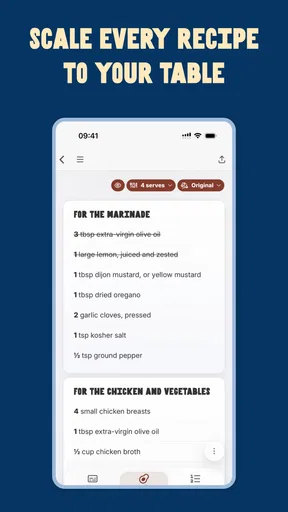
 Analysis by AppCompare
So, I recently stumbled upon this app called foodbymaria Delicious Recipes, and let me tell you, it’s like having a personal chef right in your pocket! If you’re anything like me, always on the hunt for new and exciting dishes to try, then you might want to keep reading. This app is packed with flavor, and it’s got something for every taste bud and dietary preference.
Where a recipe app can trip you up
Recipe apps often look effortless until you are standing in a shop trying to remember which ingredients you need, or you reach a step that assumes you already know a cooking technique. I find the most useful test is not how attractive a recipe looks on a screen, but whether I can turn it into a meal without extra guesswork. This app’s search and guided instructions are aimed at making that handoff from browsing to cooking easier, though a recipe still depends on having the right ingredients and enough time to follow it.
It helps to choose a dish with your real evening in mind, rather than saving the most impressive-looking option for a night when you are already tired. Before you shop, read through the full recipe and check whether its ingredients suit your pantry, equipment, and comfort level. That small habit matters: an ingredient search can help narrow choices, but it cannot tell you whether you have the time or tools to prepare a particular dish.
Getting started without adding friction
Foodbymaria Delicious Recipes is a free Food & Drink app from CookBook Co. It has a 4.7 average from around 88 ratings, and it has reached over 10,000 installs. The app is rated Everyone 10+, runs on Android 5.1 or later, and its current version is 2.2.285. Those details make it approachable for many Android users, but it is still sensible to check your device’s available storage and software compatibility before installing any app.
The app is free to download, with in-app purchases ranging from $4.99 to $27.99 per item. I would treat that as a reason to look carefully at any purchase prompt before committing, especially if you only want to browse or try a few recipes first. If your goal is simply to plan one meal, start by searching for a dish that fits ingredients you already have; there is no need to build an elaborate routine around the app before you know whether its recipes suit your cooking style.
When a screen does not behave as expected, I would first check the basics: confirm the app has finished installing, make sure the device has a working internet connection when loading content, and close and reopen it before trying again. If a recipe or image takes a while to appear, avoid tapping repeatedly, since that can make it harder to tell whether the app is responding. These are general checks rather than guarantees, but they are a sensible first pass before assuming something is wrong with the recipe or your account.
Features That Spice Things Up
First off, let’s talk about the sheer variety this app offers. The foodbymaria Delicious Recipes app is bursting with recipes that range from quick and easy meals for busy weeknights to elaborate feasts perfect for impressing your dinner guests. What caught my attention right away was the user-friendly interface. Even if you’re not a tech whiz, navigating through the app is a breeze.
Worth Reading Before You Choose

Flipboard Shows What News Apps Must Do Beyond the Feed

Switching to Android Auto Means Rethinking Your Driving Routine

Google Calendar Makes a Crowded Week Easier to Manage

Ludo King Makes the Most of the Minutes Between Plans

Baby Panda World Brings Quick Play to Modern Phones, but Its Game Library Feels Busy

ESPN’s Live Game View Makes Following Close Games Easier
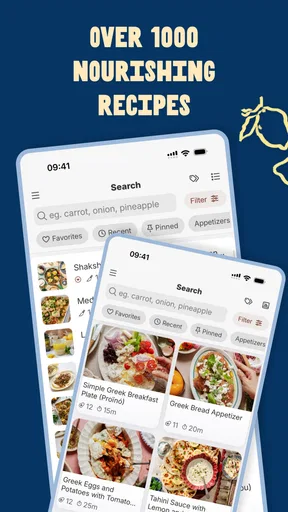
One of my favorite features is the search functionality. You can search by ingredients, meal type, or dietary needs. Whether you’re vegan, gluten-free, or just looking for something healthy, this app has got you covered. And let’s not forget the stunning photos that accompany each recipe. They’re so mouth-watering that you might find yourself drooling over your screen!
Making a useful shortlist before shopping
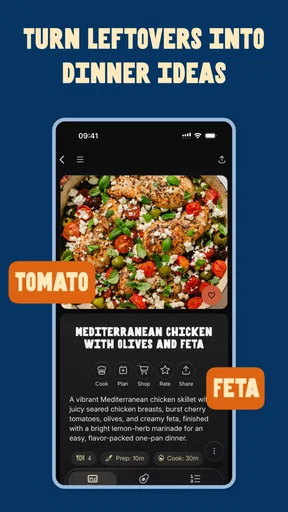
A practical way to use ingredient search is to treat it as a starting point, not a promise that every result will use only what you have. I would search for a main ingredient that needs using up, then compare a few results and read the full instructions before settling on dinner. That keeps the app useful for reducing food waste without leaving you surprised by an extra item or step once you begin cooking.
For a realistic weeknight, imagine getting home with vegetables and a protein already in the fridge but no plan. I would search around one of those ingredients, choose a recipe that matches the time I actually have, and check the directions before making a shopping list for anything missing. If the result calls for a technique I do not know, I can use the visual guidance where available; if it looks too involved, I would choose another dish rather than force the first choice.
Your Personal Sous Chef
What really sets this app apart is how it feels like having your own sous chef right there with you. Each recipe comes with step-by-step instructions that are easy to follow. Plus, there are video tutorials for those who prefer a more visual approach. It’s like having a cooking class at your fingertips.
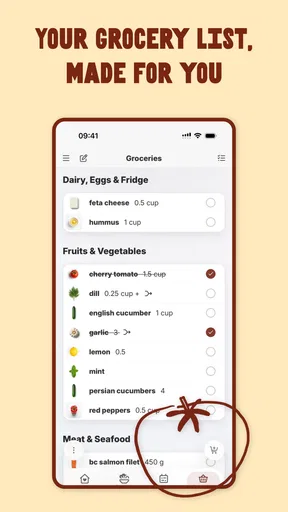
Another perk is the grocery list feature. Once you select a recipe, the app generates a shopping list for you. No more scribbling ingredients on a piece of paper and forgetting it at home. Just pull out your phone at the grocery store, and you’re all set.
The shopping list is most helpful when I use it before leaving home, while I can still compare it with what is already in the kitchen. I would check the cupboards and fridge first, then use the list as a reminder of what is missing. That avoids buying duplicate staples and makes the list a planning aid rather than a substitute for checking what I own. If I am cooking more than one dish, I would also review the ingredients across the recipes myself so I can spot overlap.
During cooking, step-by-step directions are useful when I want to keep my hands free of guesswork. I would read the next step before starting it, rather than rely on memory while chopping or handling hot pans. Video can clarify what a movement or result should look like, but it does not remove the need to pay attention to cooking times and the food in front of me. That distinction makes guided recipes better for learning than blindly following a screen.
Choosing between this and other recipe tools
Compared with a general web search, this app gives me a more focused place to browse recipes and move from choosing a dish toward following its directions. A search engine may offer a wider mix of sources and more ways to compare versions, which is useful when I want a very specific technique or a particular author’s approach. The trade-off is that bouncing between pages can make meal planning feel scattered. Here, the ingredient and dietary searches, instructions, and shopping list make a more contained cooking workflow.
It is also different from a plain digital cookbook or a notes app full of saved recipes. Those options can be better if I want to preserve my own collection exactly as written, or if I already know what I cook and do not need fresh browsing. This app is more appealing when I want help finding a direction and turning it into a shopping plan. I would not choose it as my only source for strict medical dietary advice: a dietary search can help discover relevant recipes, but I would still inspect every ingredient and make decisions based on my own needs.
Community and Inspiration
If you’re someone who loves sharing your culinary creations, you’ll appreciate the community aspect of this app. You can connect with other users, share recipes, and even get feedback. It’s like joining a global dinner party where everyone’s invited!
The app also offers daily inspiration through its blog section. Whether it’s tips for better meal prep or stories behind certain dishes, there’s always something new to learn and try.
I see the community and blog as extras rather than requirements for getting dinner on the table. If I want a direct answer about a recipe, I would first check its own directions; community feedback can offer ideas, but another person’s result may depend on different ingredients or experience. The blog is more useful when I have time to browse for inspiration than when I need a quick fix for a meal already underway.
When a snag may not be the app
If a recipe feels difficult, the cause may be a mismatch between the dish and my available time, equipment, or experience rather than a technical problem. I would re-read the instructions, check ingredient quantities, and make sure I have not skipped a preparation step. If the app itself appears unresponsive, I would try the basic connection and restart checks first. If the issue happens only with one recipe, switching to another dish is a practical way to keep dinner moving while I work out what is going on.
Likewise, a shopping list cannot decide whether an ingredient is a suitable substitute or whether a dish meets a personal dietary requirement. I would use the list to organize shopping, then make those judgments myself. This is a small but important boundary: recipe guidance can save planning effort, while the cook remains responsible for checking ingredients and adapting safely.
Who will enjoy it, and who may prefer something else
I think this app is best for curious home cooks who want ideas and appreciate having search, directions, and shopping support close together. It can also suit someone trying to make a routine less repetitive: searching by meal type or dietary preference gives a starting point when the usual rotation has become stale. Beginners may like having clear steps and videos to refer to, while more experienced cooks can use the collection as a prompt rather than treating every instruction as a rule.
It may be a weaker fit if you prefer to cook entirely from memory, need a highly specialized recipe database, or want to manage a carefully curated personal cookbook above all else. Someone who relies on a strict nutrition or allergy workflow should verify each recipe independently instead of assuming a search category settles the question. And if you dislike browsing on a phone while cooking, a printed recipe or a cookbook may be a calmer option.
Final Thoughts: Is It Worth Downloading?
In my humble opinion, if you’re passionate about cooking or simply looking to spice up your meal routine, foodbymaria Delicious Recipes is definitely worth a download. It’s not just an app; it’s a culinary journey that invites you to explore new flavors and techniques.
Whether you’re a seasoned chef or a kitchen newbie, this app has something for everyone. It’s like getting a ticket to a world of delicious possibilities, all from the comfort of your kitchen. So go ahead, give it a try, and who knows? You might just find your new favorite dish!
My practical recommendation is to begin with one meal you genuinely want to cook, then judge the app by how smoothly it takes you from search to ingredients to the finished dish. If that flow fits your habits, it can become a handy source of variety without replacing your own judgment. I would keep it for inspiration and guided planning, while turning to a specialist source or my own notes whenever precision matters more than discovery.
Pros
- User-friendly interface for easy navigation.
- Wide variety of recipes for all diets.
- High-quality images enhance user experience.
- Step-by-step instructions are clear and concise.
- Offline access for recipes without internet.
Cons
- Limited customization for dietary preferences.
- Occasional app crashes during updates.
- Requires account for saving favorites.
- No calorie count for some recipes.
- Ads can be intrusive at times.
FAQs for foodbymaria Delicious Recipes
What features does the FoodbyMaria Delicious Recipes app offer?
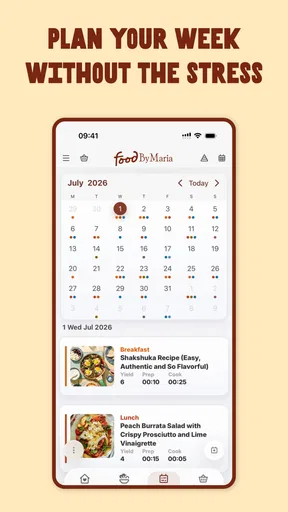
The FoodbyMaria Delicious Recipes app provides a wide array of features, including a vast collection of plant-based recipes, detailed step-by-step cooking instructions, nutritional information for each dish, and customizable meal planning options. Users can also create shopping lists and explore new recipes through regular updates, enhancing their culinary experience.
Is the app suitable for beginners in cooking?
Yes, the FoodbyMaria Delicious Recipes app is designed to cater to both beginners and experienced cooks. Each recipe comes with easy-to-follow instructions and visuals, making it accessible for those new to cooking. The app also provides helpful tips and cooking techniques to build confidence in the kitchen.
Are there any in-app purchases or subscriptions required?
The app offers a free version with access to a selection of recipes. However, to unlock the full range of features and exclusive content, users can opt for a subscription model. This premium version includes additional recipes, personalized meal plans, and ad-free browsing, enhancing the overall user experience.
Does the app support dietary preferences and restrictions?
Absolutely. The FoodbyMaria Delicious Recipes app includes filters for various dietary needs, such as gluten-free, nut-free, and soy-free options. Users can easily search for recipes that match their specific dietary preferences, ensuring that everyone can enjoy delicious and suitable meals.
Can I use the app offline?
Yes, the app allows users to save their favorite recipes for offline access. This feature is particularly useful for those who want to cook without internet connectivity. Simply download recipes while online, and they’ll be available in your library for offline viewing whenever needed.


